BACK BUTTON CODE IN SPRING:
<a href="${pageContext.request.contextPath}/" class="btn btn-outline-danger">Back</a>
BACK BUTTON CODE IN SPRING:
<a href="${pageContext.request.contextPath}/" class="btn btn-outline-danger">Back</a>
https://blog.theodo.com/2018/01/search-destroy-duplicate-rows-postgresql/
SELECT
  firstname,
  lastname,
  count(*)
FROM people
GROUP BY
  firstname,
  lastname
HAVING count(*) > 1;
+-----------+-----------+-------+
| firstname | lastname | count |
+-----------+-----------+-------+
| Maria | Green | 3 |
| Paul | Jones | 2 |
+-----------+-----------+-------+ spring-servlet.xml configuration
<?xml version="1.0" encoding="UTF-8"?>
<beans xmlns="http://www.springframework.org/schema/beans"
        xmlns:xsi="http://www.w3.org/2001/XMLSchema-instance"
        xmlns:context="http://www.springframework.org/schema/context"
        xmlns:mvc="http://www.springframework.org/schema/mvc"
        xsi:schemaLocation="http://www.springframework.org/schema/beans
        http://www.springframework.org/schema/beans/spring-beans.xsd
    http://www.springframework.org/schema/context
    http://www.springframework.org/schema/context/spring-context.xsd
    http://www.springframework.org/schema/mvc
    http://www.springframework.org/schema/mvc/spring-mvc.xsd">

    <context:component-scan base-package="com.zetcode"/>
    <mvc:annotation-driven/>
    <mvc:default-servlet-handler/>

    <bean id="templateResolver"
            class="org.thymeleaf.spring5.templateresolver.SpringResourceTemplateResolver">
        <property name="prefix" value="/WEB-INF/templates/"/>
        <property name="suffix" value=".html"/>
        <property name="templateMode" value="HTML"/>
    </bean>

    <bean class="org.thymeleaf.spring5.view.ThymeleafViewResolver">
        <property name="templateEngine" ref="templateEngine"/>
    </bean>

    <bean id="templateEngine" class="org.thymeleaf.spring5.SpringTemplateEngine">
        <property name="templateResolver" ref="templateResolver"/>
    </bean>

</beans>
The spring-servlet.xml configures the Spring web application. It enables component scanning, Spring web annotations (@Controller) and configures the Thymeleaf template.
<context:component-scan base-package="com.zetcode" />
This tells Spring where to look for classes with @Controller, @Repository, @Service, @Component annotations and register them. In our case, we have a controller with the @Controller annotation.
<mvc:annotation-driven/>
The <mvc:annotation-driven/> enables web based Spring annotations.
<mvc:default-servlet-handler/>
We need this tag to enable static HTML files. We have one static index.html for the home page.
<bean id="templateResolver"
        class="org.thymeleaf.spring5.templateresolver.SpringResourceTemplateResolver">
    <property name="prefix" value="/WEB-INF/templates/"/>
    <property name="suffix" value=".html"/>
    <property name="templateMode" value="HTML"/>
</bean>

<bean class="org.thymeleaf.spring5.view.ThymeleafViewResolver">
    <property name="templateEngine" ref="templateEngine"/>
</bean>

<bean id="templateEngine" class="org.thymeleaf.spring5.SpringTemplateEngine">
    <property name="templateResolver" ref="templateResolver"/>
</bean>
These lines configure Thymeleaf with a template engine, template view resolver, and a template resolver. In the template resolver we specify where the templates are located and their extensions.
<?xml version="1.0" encoding="UTF-8"?>
<web-app xmlns="http://xmlns.jcp.org/xml/ns/javaee"
            xmlns:xsi="http://www.w3.org/2001/XMLSchema-instance"
            xsi:schemaLocation="http://xmlns.jcp.org/xml/ns/javaee
            http://xmlns.jcp.org/xml/ns/javaee/web-app_4_0.xsd"
            version="4.0">

    <welcome-file-list>
        <welcome-file>index.html</welcome-file>
    </welcome-file-list>

    <servlet>
        <servlet-name>spring</servlet-name>
        <servlet-class>
            org.springframework.web.servlet.DispatcherServlet
        </servlet-class>
        <load-on-startup>1</load-on-startup>
    </servlet>

    <servlet-mapping>
        <servlet-name>spring</servlet-name>
        <url-pattern>/</url-pattern>
    </servlet-mapping>

    <session-config>
        <session-timeout>
            30
        </session-timeout>
    </session-config>
</web-app>
<?xml version="1.0" encoding="UTF-8"?>
<!DOCTYPE hibernate-configuration SYSTEM
"http://www.hibernate.org/dtd/hibernate-configuration-3.0.dtd">
<hibernate-configuration>
<session-factory>
<property name="hibernate.dialect"> org.hibernate.dialect.PostgreSQLDialect</property>
<property name="hibernate.connection.driver_class"> org.postgresql.Driver</property>
<!-- Assume test is the database name -->
<property name="hibernate.connection.url">jdbc:mysql://localhost:5432/test </property>
<property name="hibernate.connection.username">postgres</property>
<property name="hibernate.connection.password">admin </property>
<!-- Drop and re-create the database schema on startup -->
<property name="hbm2ddl.auto">create</property>
<property name="show_sql">true</property>
<!-- List of XML mapping files -->
<mapping class="com.manoj.hibernate.User" />
</session-factory>
</hibernate-configuration>
<bean id="myDataSource"
        class="org.springframework.jdbc.datasource.DriverManagerDataSource">
        <property name="driverClassName" value="org.postgresql.Driver" />
        <property name="url" value="jdbc:postgresql://localhost:5432/dbname" />
        <property name="username" value="postgres" />
        <property name="password" value="" />
        <!--<property name="socketTimeout" value="10"/>-->

        <property name="connectionProperties">
            <props>
                <prop key="socketTimeout">10</prop>
            </props>
        </property>
</bean>In object oriented design, cohesion refers all about how a single class is designed. Cohesion is the Object Oriented principle most closely associated with making sure that a class is designed with a single, well-focused purpose.
The more focused a class is, the cohesiveness of that class is more. The advantages of high cohesion is that such classes are much easier to maintain (and less frequently changed) than classes with low cohesion. Another benefit of high cohesion is that classes with a well-focused purpose tend to be more reusable than other classes.
Example : Suppose we have a class that multiply two numbers, but the same class creates a pop up window displaying the result. This is the example of low cohesive class because the window and the multiplication operation don’t have much in common.
To make it high cohesive, we would have to create a class Display and a class Multiply. The Display will call Multiply’s method to get the result and display it. This way to develop a high cohesive solution.
Lets understand the structure of high cohesive program :
Output:
25
Output:
Geeksforgeeks
10
1234567891
Pictorial view of high cohesion and low cohesion: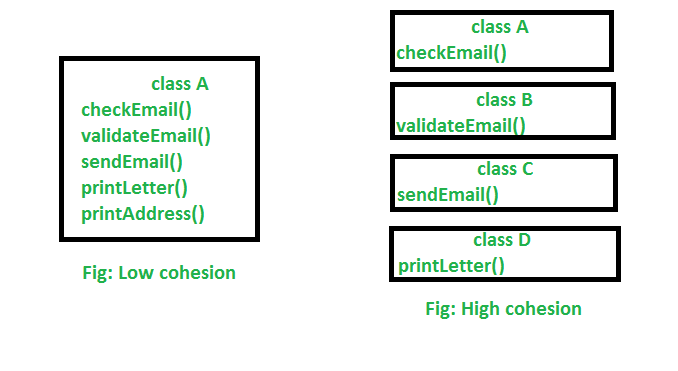
Explanation : In the above image, we can see that in low cohesion only one class is responsible to execute lots of job which are not in common which reduces the chance of re-usability and maintenance. But in high cohesion there is a separate class for all the jobs to execute a specific job, which result better usability and maintenance.
Difference between high cohesion and low cohesion:
In object oriented design, Coupling refers to the degree of direct knowledge that one element has of another. In other words, how often do changes in class A force related changes in class B.
There are two types of coupling:
Explanation: In the above program the Subject class is dependents on Topic class. In the above program Subject class is tightly coupled with Topic class it means if any change in the Topic class requires Subject class to change. For example, if Topic class understand() method change to gotit() method then you have to change the startReading() method will call gotit() method instead of calling understand() method.
Output:
125
Explanation:In the above example, there is a strong inter-dependency between both the classes. If there is any change in Box class then they reflects in the result of Class Volume.
Explanation : In the above example, Topic1 and Topic2 objects are loosely coupled. It means Topic is an interface and we can inject any of the implemented classes at run time and we can provide service to the end user.
Output:
125
Explanation : In the above program, there is no dependency between both the classes. If we change anything in the Box classes then we dont have to change anything in Volume class.
Which is better tight coupling or loose coupling?
In general, Tight Coupling is bad in but most of the time, because it reduces flexibility and re-usability of code, it makes changes much more difficult, it impedes test ability etc. loose coupling is a better choice because A loosely coupled will help you when your application need to change or grow. If you design with loosely coupled architecture, only a few parts of the application should be affected when requirements change.
Lets have a look on the pictorial view of tight coupling and loose coupling: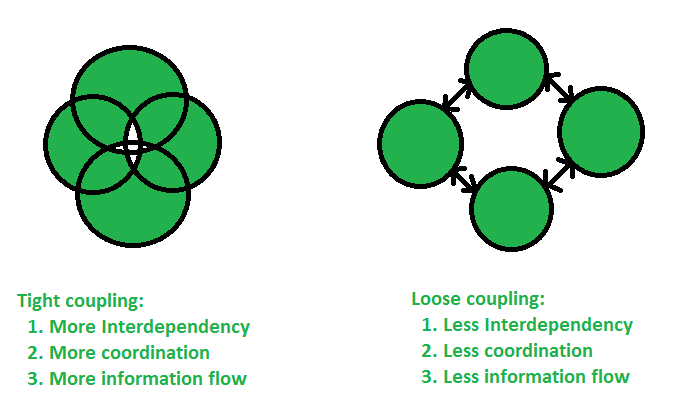
Difference between tight coupling and loose coupling
This article is contributed by Bishal Kumar Dubey. If you like GeeksforGeeks and would like to contribute, you can also write an article using contribute.geeksforgeeks.org or mail your article to contribute@geeksforgeeks.org. See your article appearing on the GeeksforGeeks main page and help other Geeks.
Please write comments if you find anything incorrect, or you want to share more information about the topic discussed above.
Attention reader! Don’t stop learning now. Get hold of all the important Java and Collections concepts with the Fundamentals of Java and Java Collections Course at a student-friendly price and become industry ready.
1) There are two classes which implement RandomAccess Interface. They are:
ArrayList (Part of List<I>)
Vector    (Part of List<I>)
2) The purpose of RandomAccess Interface is to retrieve any random element in the Collection at the same speed. Example: I have a collection of 1 million objects. Implementing RandomAccess interface makes your time to retrieve the 10th element and 17869th element the same. This makes ArrayList and Vector more powerful.
3) RandomAccess Interface has no methods or fields and is also called a Marker Interface. These are used to indicate something to the compiler, in other words implementing these interfaces is meant to imply some special treatment of the implementing class.

